Expandi is a strong choice if you rely heavily on LinkedIn and email outreach for B2B lead generation and want to scale safely and efficiently. It works especially well for agencies, sales and growth teams managing multiple accounts or running high-volume outbound. Its biggest strengths are smart multichannel sequencing, advanced personalization and a unified inbox that keeps everything tidy. On the downside, Expandi can feel pricey for solo users and requires a bit of time to get used to the platform.
If you’ve ever tried keeping up with manual LinkedIn outreach or juggling multiple inboxes (been there, done that), you know how chaotic outbound can get. And if you manage outreach for several clients, the complexity grows even faster. That’s exactly where Expandi has helped me the most.
In this review, I walk through what Expandi does well, where it feels weaker and whether it’s worth investing in depending on your goals.
Pros
✅ Multichannel automation with LinkedIn and email inside one sequence
✅ Advanced targeting for precise audience selection
✅ Smart Inbox merges LinkedIn and email replies into one place
✅ AI personalization for messages, icebreakers and templates
✅ Integrations with HubSpot, Zapier and webhook support
✅ Dedicated IP and warm-up tools for safer outreach
✅ Unlimited campaigns and strong sequence customization
Cons
⛔ More expensive than lightweight tools
⛔ Some learning curve when building complex sequences
⛔ Reporting is solid but not enterprise-deep
⛔ Occasional integration quirks
⛔ LinkedIn automation always carries some risk despite safety features
What is Expandi
Expandi is a cloud-based email and LinkedIn automation platform built to help you automate connection requests, follow-ups, messaging and email outreach from one place. It replaces repetitive manual outreach with scalable workflows.
The fact that it runs completely in the cloud means you don’t depend on browser extensions or your computer staying on. Expandi simulates human behavior with realistic pacing and offers safety features like warm-up schedules and action limits.
Some standout qualities include:
- Multichannel that works well (LinkedIn and email)
- Smart Inbox for handling all replies
- Strong targeting and filtering options
- Personalization with dynamic fields and AI support
- Integration flexibility for CRM syncing and workflow automation
In short, Expandi gives structure to outbound processes that usually feel messy when done manually.
Who is Expandi for
Expandi shines for:
Agencies
If you manage multiple clients or LinkedIn accounts, Expandi’s organizational structure and sequence flexibility save huge amounts of time.
Sales and SDR teams
SDRs benefit from consistent follow-ups, messaging templates and a centralized reply hub.
Growth marketers
Teams running demand gen or top-of-funnel programs will appreciate how Expandi connects with CRMs and automation tools.
Recruiters
If LinkedIn outreach is essential to your role, Expandi streamlines candidate sourcing and follow-up.
Less ideal for:
- Casual users or people doing minimal outreach
- Teams that require channels beyond LinkedIn and email
- Budgets that require the lowest-cost tools available
Expandi Main Features
Smart sequences for LinkedIn and email

What it does:
You can create multi-step campaigns combining LinkedIn actions (views, follows, connection requests, messages) and email steps.
Why it matters:
Most deals come from follow-ups. Automating them keeps outreach consistent without manual effort.
Use case:
Campaigns that start with a connection request and automatically shift to email if the person does not respond on LinkedIn.
Limitations:
No support for SMS, calls or social channels beyond LinkedIn.
Advanced targeting and filters
What it does:
Segment your outreach by industry, seniority, geography and more using LinkedIn search or imported lead lists.
Why it matters:
Better targeting improves reply rates and keeps messaging relevant.
Use case:
Creating separate sequences for VP-level decision-makers versus managers.
Limitations:
Only as strong as the data and filtering from LinkedIn or your imports.
Smart Inbox
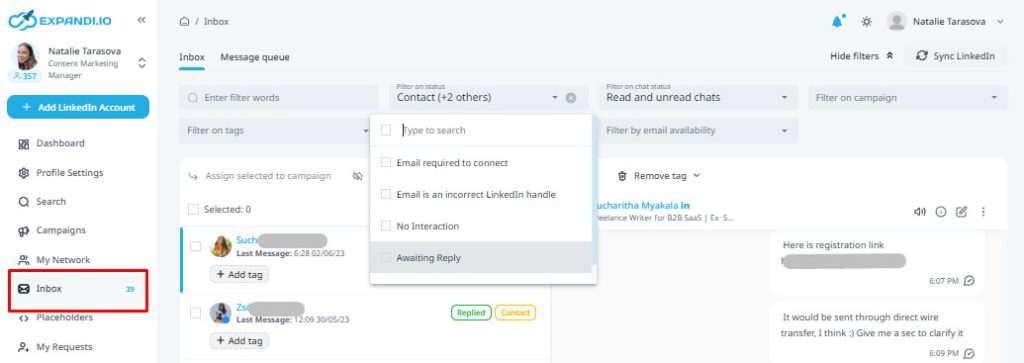
What it does:
Centralizes all LinkedIn and email replies so you never miss a message.
Why it matters:
When managing multiple campaigns or accounts, jumping between inboxes becomes a headache. Smart Inbox keeps everything in one dashboard.
Use case:
Responding to replies across different client accounts without logging into separate LinkedIn profiles.
Limitations:
High-volume inboxes still require good tagging and organization.
AI personalization
What it does:
Helps generate personalized message variations, rewrite intros and insert dynamic fields.
Why it matters:
Personalized outreach consistently outperforms generic templates.
Use case:
Generating custom openers for prospects based on their role or company.
Limitations:
Human review is still needed to ensure tone and relevance.
Safety features
What it does:
Expandi uses warm-up schedules, random action timing, daily limits and dedicated IPs to simulate human behavior.
Why it matters:
LinkedIn restrictions are real. Safety-first automation reduces risk.
Use case:
Gradually increasing activity volume for new accounts to avoid red flags.
Limitations:
No automation platform can guarantee zero risk.
Integrations, APIs and Webhooks
What it does:
Connects Expandi with HubSpot, Zapier, CRMs and workflow automation tools.
Why it matters:
Outbound is most effective when data flows to your CRM and follow-up systems.
Use case:
Pushing replies into HubSpot or sending Slack alerts for hot leads.
Limitations:
Some users experience minor friction during the initial setup.
Analytics and reporting

What it does:
Shows reply rates, connection acceptance rates and message performance across campaigns.
Why it matters:
You can optimize messaging and audience targeting with real data.
Use case:
A/B testing follow-up timing or message angles.
Limitations:
Not designed for deep attribution or advanced analytics teams.
Pricing
Current plans are:
| Plan | Price | What You Get |
|---|---|---|
| Business Plan | 99 USD per LinkedIn account monthly | Full access to outreach automation, Smart Inbox, sequences, dedicated IP and personalization tools |
| Annual Business | About 79 USD per account monthly | Same features with a discount |
| Custom Agency Plans | Custom pricing | Suitable for large teams managing many accounts |
| Free Trial | 7-day free trial | Full access for testing |
Value: Great value for teams and agencies that run structured outreach. For solo users, the cost might feel high unless outreach is a core revenue activity.
My take: If LinkedIn plus email outreach is central to your pipeline, Expandi’s pricing makes sense. If you’re just exploring outbound for the first time, it may feel like more tool than you need.
User feedback
My own experience with Expandi’s support has been smooth. I usually get helpful responses quickly, and the onboarding materials are straightforward. This aligns with most user reviews and third-party analyses.
Positive themes from reviewers
- Expandi saves a lot of manual time by automating both LinkedIn and email workflows.
- The Smart Inbox and sequencing features are frequently praised.
- Support is generally responsive and helpful.
- Many users report improved reply rates thanks to personalization and targeting.
- Cloud automation feels safer and more stable than browser extensions.
Common criticisms
- Some users struggle with the learning curve, especially during early setup.
- Integrations occasionally require troubleshooting.
- Analytics could be more advanced for data-heavy teams.
- A few reviewers mention minor bugs when running many accounts or complex campaigns.
- As with all LinkedIn automation, there is inherent account risk.
Across major platforms like G2 and Trustpilot, Expandi typically scores between 4.1 and 4.2 out of 5. Agencies, SDR teams and growth marketers tend to be the happiest users, while beginners sometimes feel overwhelmed by its capabilities.

Most reviewers agree on the same takeaway:
Expandi is highly effective for structured outreach and multichannel LinkedIn plus email campaigns.
Expandi alternatives
| Competitor | Strengths vs Expandi | Where Expandi Wins |
|---|---|---|
| Waalaxy | Lower cost and simpler for beginners | More powerful sequencing, better personalization and stronger safety |
| HeyReach | Great for multi-account rotation | Expandi offers email automation and deeper outreach logic |
| Dripify | Easy to use for individuals | Expandi has stronger AI tools and Smart Inbox |
| Dux-Soup | Highly customizable Chrome extension | Expandi is safer, cloud-based and better for scale |
| Meet Alfred | Multichannel with scheduling and posting | Expandi focuses better on outbound performance and personalization |
| Manual outreach | No risk or automation issues | Impossible to scale compared to Expandi’s automation |
Things I Like
✅ Powerful multichannel sequences
✅ AI personalization that feels genuinely useful
✅ Smart Inbox that keeps replies organized
✅ Strong safety profile for LinkedIn automation
✅ Integrations that connect easily with a GTM stack
✅ Great fit for agencies and SDR teams
Things I Don’t Like
⛔ Pricing is high for casual users
⛔ Limited to LinkedIn and email
⛔ Reporting could be more in-depth
⛔ Takes time to become fully comfortable
⛔ Requires CRM support for complete workflows
Final Verdict
If LinkedIn plus email are core to your outbound strategy, Expandi is absolutely worth considering. It gives you structure, automation, personalization and safety features that make high-volume outreach far more manageable. Agencies and sales teams get the most value, but any business running consistent outreach can benefit.
If you’re new to automation or only sending occasional messages, the price and complexity might feel like more than you need. But once you’re serious about outbound, Expandi becomes a powerful part of your toolkit.
For scalable, reliable LinkedIn and email outreach, Expandi stands out as one of the strongest platforms available today.