
HeyReach is a strong choice if you rely heavily on LinkedIn for B2B outreach and want to scale safely and efficiently — especially for agencies or sales teams managing many accounts. Its biggest strengths are multi-account support, a centralized inbox, and integrations that streamline workflow. On the downside, it’s LinkedIn-only (no built-in multichannel/email outreach) and may feel pricey or overkill for solo users or small-scale campaigns.
Trying to grow your outreach on LinkedIn but drowning in tedious manual steps? Or managing several clients and need a tool to organize, automate and scale your efforts without risking bans or chaos? That’s exactly where HeyReach aims to shine.
In this review, I break down what it does well, where it falls short, and whether it’s a smart investment depending on your size and needs.
Pros & Cons
PROS
✅ Multi-account outreach & rotation — send messages from many LinkedIn accounts to scale safely.
✅ Unified Inbox (“Unibox”) — manage conversations from all accounts in one place.
✅ Solid CRM & GTM-stack integrations (HubSpot, Pipedrive, Zapier, webhooks, etc.) — good for automation and workflow.
✅ Transparent, flat-fee pricing for agencies — easier to budget when scaling.
✅ Intuitive dashboard & decent reporting for campaign analysis.
CONS
⛔️ LinkedIn-only (no built-in multichannel/email outreach), which limits outreach channels.
⛔️ Has a learning curve — complexity grows if you scale quickly.
⛔️ Reporting and analytics are adequate but not as advanced as tools designed for heavy data-driven outreach.
⛔️ For solo users or small teams — cost and overhead might outweigh benefits.
What is HeyReach?
HeyReach is a LinkedIn outreach automation tool and campaign-management platform. Its main goal: let agencies, sales teams, or outbound-growth operations scale LinkedIn prospecting safely and efficiently. The core value is that instead of doing all outreach manually (sending connection requests, messages, follow-ups, etc.), you automate sequences across multiple LinkedIn accounts (“senders”), manage all conversations in a unified inbox, and integrate with your CRM or tools stack for lead flow.
What differentiates it:
- It supports multi-account rotation — avoids triggering LinkedIn-imposed limits on one account.
- It gives you a central hub (Unibox) — all inboxes merged, simpler to manage replies and outreach.
- It has integrations & APIs/webhooks — works with CRM tools, automations, enrichment tools.
In short, HeyReach aims to turn LinkedIn from a manual grind into a scalable outbound engine.
Who is HeyReach for?
HeyReach shines for:
- Agencies managing multiple clients, many LinkedIn accounts, need centralized management and whitelabel capabilities.
- Sales teams / SDR teams who want to scale outreach across many accounts and leads without manual follow-up chaos.
- Growth & GTM teams integrating LinkedIn outreach into a broader stack (CRM, automation, enrichment).
- Solo founders or small businesses only if LinkedIn is your primary or main outreach channel, and you need to handle more volume than manual outreach allows.
It’s less ideal for:
- Individuals who want occasional, low-volume outreach.
- Teams that need a full multichannel outreach stack (LinkedIn + email + ads) — then HeyReach alone might feel limiting.
HeyReach main features
Multi-account rotation / Sender management
- What it does: You can connect multiple LinkedIn profiles (“senders”) under one HeyReach workspace. Campaigns will rotate between senders to distribute workload.
- Why it matters: LinkedIn often limits how many connection requests/messages you can send per account daily — rotating accounts helps avoid restrictions while scaling.
- Practical use-case: If you run outreach for 5–10 clients, each with a separate LinkedIn account, you can run a single campaign that uses all accounts, saving time and risk.
- Limitations: You still need “realistic” pacing and probably a proxy setup; automation doesn’t guarantee zero risk.
Unified Inbox (Unibox)
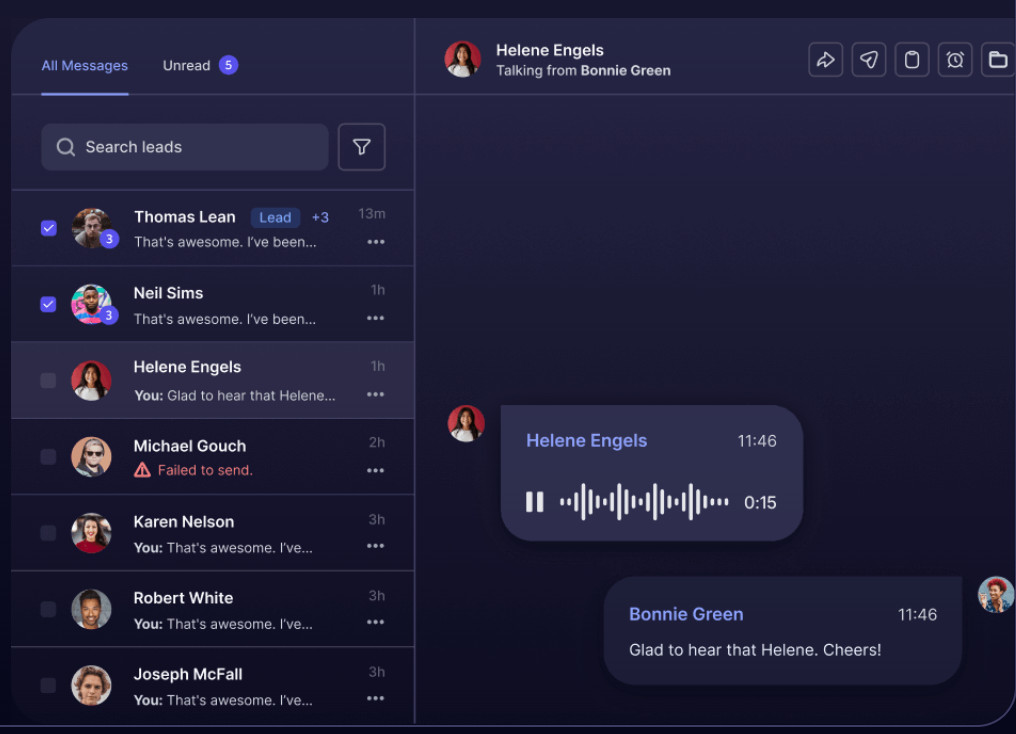
- What it does: All outgoing/incoming messages across senders get centralized into one unified conversation inbox.
- Why it matters: Saves you from logging in/out of multiple LinkedIn accounts; easier to track replies, manage follow-ups, and avoid missing responses.
- Use-case: For teams — VAs, SDRs, account managers — who handle many accounts and leads; simplifies collaboration.
- Limitations: For very high volume, you may still need to be careful with organization — tagging, filters, tracking which sender sent what.
Campaign automation & sequences (connections, messages, InMails, follow-ups)
- What it does: Lets you build automated outreach sequences — connection request → follow-up message → InMail → follow-up, with delays and conditional logic.
- Why it matters: Saves time; ensures consistency; helps with follow-ups (which often get highest reply rates).
- Use-cases: Warm-up campaigns, drip sequences, outreach to large lead lists, re-engagement campaigns.
- Limitations: Since HeyReach is LinkedIn-only, you won’t cover email outreach or other channels within same tool.
Integrations & API / Webhooks / GTM stack support
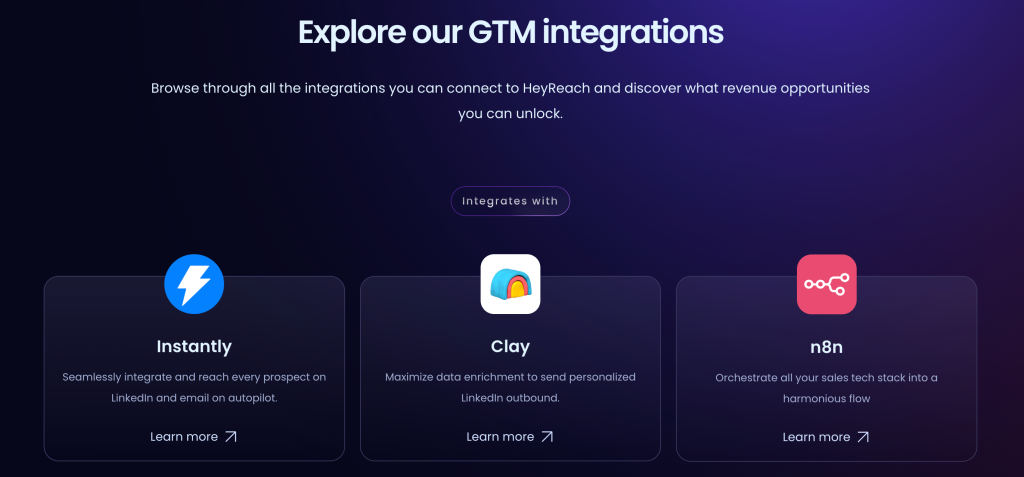
- What it does: Native (or through Zapier/Make) integrations with tools like HubSpot, Pipedrive, enrichment tools, CRMs, or custom workflows via API/webhooks.
- Why it matters: Lets you fit HeyReach into your existing sales/marketing stack — no siloed workflow.
- Use-cases: Auto-push LinkedIn leads into CRM, trigger email or other follow-up workflows, combine LinkedIn data with enrichment & scoring tools, etc.
- Limitations: Doesn’t solve lack of email deliverability or multi-channel outreach; you may need additional tools to build full multichannel outreach.
They've recently integrated with Instantly and Smartlead meaning you can basically outreach prospects via email as well.

For all available integrations, see HeyReach integrations page.
Reporting & Analytics / Campaign Insights

- What it does: Dashboard shows campaign metrics, performance across senders, reply rates, success rates — exportable reports (CSV, PNG, SVG) for sharing or client reports.
- Why it matters: Helps measure ROI, optimize outreach messages/sequences, track performance across clients/accounts.
- Use-cases: Monthly client reports, A/B testing message templates, scaling decisions based on data.
- Limitations: Compared to some premium tools, analytics might feel basic or lacking deep insights (e.g., no email deliverability, multi-channel attribution).
Pricing
| Plan | What you get |
|---|---|
| Starter – 1 sender / seat | $79/month (drops to ~$59 if 10+ senders) — good for solo or small-team testing. |
| Agency – e.g. 50 senders | $999/month — flat fee, unlimited campaigns, suitable for agencies managing many clients. |
| Unlimited – unlimited senders/accounts | $1,999/month — for larger teams/agencies needing maximal scale. |
- Free trial: 14-day trial for Starter (no credit card required).
- Value: For agencies and high-volume outreach operations — the flat-fee plans deliver strong value and predictable costs. For solo users or small teams — it may feel expensive and under-utilized.
My take: Pricing is fair and transparent — a good match for medium–to large–sized teams or agencies. The starter plan is reasonable for individuals who want to test or run small campaigns, but it soon reaches its limitations when scaling.
Customer Support & User Feedback
- According to verified reviews (e.g. on G2), HeyReach scores high for ease of use, affordability, automation, and overall value. Many users say onboarding was smooth and interface intuitive.
- Some complaints do exist: occasional bugs, limited features compared to premium tools, and a learning curve when managing many senders/campaigns.
- Support appears responsive (per testimonials) — but as with many SaaS tools, heavier usage reveals limitations, and support may struggle if the setup is complex (many integrations, many accounts).
External Reviews & Reputation
- On G2, the average rating is strong (≈ 4.7/5), with praise for automation, lead-generation scale, and integration flexibility.
- Reviewers highlight that HeyReach helped them “scale LinkedIn outreach by 7–10×” and get more responses per campaign.
- Criticisms: limited to LinkedIn (no email outreach), sometimes simple reporting, occasional bugs or performance issues.
Overall, real-world feedback suggests that HeyReach delivers on its promises, especially for agencies or teams that need scale.
Competitor Comparison
Here are a few well-known alternatives, and how they compare to HeyReach:
| Tool / Competitor | Strengths vs HeyReach | Where HeyReach Is Better |
|---|---|---|
| Waalaxy | Often marketed as LinkedIn + email outreach → better multichannel capabilities. | HeyReach wins if you need multi-account rotation, whitelabel, or agency-scale LinkedIn outreach. |
| Expandi | More advanced analytics, broader automation flows, polished UI, email + LinkedIn sequencing. | HeyReach typically offers more cost-efficient scaling and simpler multi-account management — ideal for agencies. |
| Dripify | Strong safety limits, onboarding simplicity, good for solo operators, more “set it and forget it.” | HeyReach provides stronger multi-account rotation, team features, and agency-grade scaling without per-seat pricing. |
| Dux-Soup | Highly customizable Chrome extension; flexible for technical users and niche workflows. | Cloud-based reliability, safer scaling, and centralized multi-account management give HeyReach a clear edge. |
| MeetAlfred | Polished multichannel campaigns (LinkedIn + email + Twitter), strong scheduling + content posting tools. | HeyReach focuses on high-volume LinkedIn automation with smoother account rotation and more affordable scaling for agencies. |
| Manual outreach | Full control, zero automation risk, no subscription fee. | Not scalable and extremely time-consuming. HeyReach wins for automation, rotation, and volume. |
Bottom line: If your focus is solely LinkedIn and you manage many accounts or clients, HeyReach is among top choices. If you need deeper multichannel outreach or advanced analytics, a competitor with email + LinkedIn + richer analytics may suit better.
Things I Like:
- ✅ Effective multi-account outreach and rotation
- ✅ Unified inbox simplifies communication management
- ✅ Integrations & API/webhook support make it stack-friendly
- ✅ Flat-fee pricing model for agencies — predictable scaling costs
- ✅ Good balance between automation and LinkedIn compliance safety
Things I Don’t Like:
- ⛔️ Limited to LinkedIn — no built-in email or other channel outreach
- ⛔️ Analytics & reporting are basic compared to full-growth tools
- ⛔️ Might feel overkill for solo users or small teams
- ⛔️ Learning curve and some minor bugs under heavy use
- ⛔️ To avoid risk, must use proxies and careful sending — still some inherent risk
Final Verdict
If you’re an agency, sales team, or growth-oriented operation relying heavily on LinkedIn for B2B lead gen — HeyReach is absolutely worth it. It gives you the ability to scale outreach across many accounts, manage all communication in one place, integrate with your CRM/automation stack, and scale without per-seat chaos. The flat-fee model makes planning predictable, and the core automation features are solid.
If, on the other hand, you’re a solo user, small team, or you need multichannel outreach (e.g., email + LinkedIn) — HeyReach could still be useful as a LinkedIn booster, but you may quickly hit its limitations. In that case, consider complementing it with other tools or picking a tool designed for multichannel outreach.
Bottom line: For serious LinkedIn-driven outreach at scale — HeyReach belongs in your toolkit. For casual or multichannel outreach — think carefully and maybe combine or choose alternatives.